






Every Call Matters
All VoIP network have quality issues. And when your users complain about echo, garbled conversations, or dropped calls, it’s up to you to fix it. Fast.
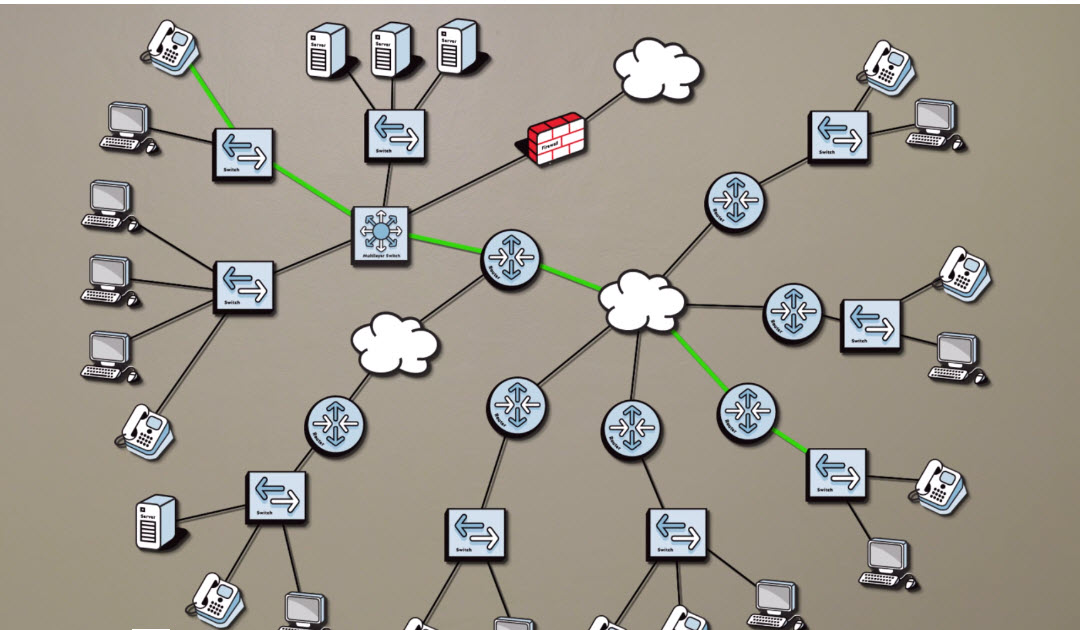
But there are hundreds of reasons for poor voice quality and worse yet, potentially hundreds or even thousands of links, routers, and switches to check across any number of locations. In today’s economy, do you have the resources to perform all this troubleshooting and resolve your problems quickly?
That’s where we come in. PathSolutions VoIP Performance Manager:
- Continuously monitors the performance of your entire VoIP network.
- Tells you when, where, and why VoIP problems occur and even recommends how to fix them – in plain-English.
- Covers all corners of your network and beyond—isolating problems even when they occur on your carrier’s network or other third party networks.
We solve all your performance problems—even the ones other solutions miss.
Business Benefits
Proactive Network Optimization, Less Poor Quality or Dropped CallsThe health and performance of every device, router, and link in your network is constantly tracked and the Prescription Engine tells you when, where, and why problems occur as well how to resolve them. You are able to identify issues before they become problems, making your IT resources more productive and your VoIP network more efficient, virtually eliminating poor quality or dropped calls. |
|
Fast Deployment, Less Setup TimeMost performance management tools takes days or weeks to deploy, but VoIP Performance Manager deploys in less than an hour. It automatically discovers your network, configures itself, and starts monitoring. Your IT team spends less time setting up the system—instead, they spend their valuable time on improving the network. |
|
Makes the Most of Your Infrastructure InvestmentWith PathSolutions, most organizations find and resolve more problems on their VoIP network within the first few minutes of deployment than have been resolved in the previous year. Issues are identified before they become problems, network performance is always optimal, and your IT team is more productive—making the most out of your infrastructure investment. |
|
An Extra Resource—Without the OverheadMost companies and organizations are often tasked with doing more with less and budget constraints, in up or down economies, are always an issue. With VoIP Performance Manager, it’s as if you have an extra senior-level VoIP engineer working just for you as it automatically monitors all your switches and routers, finds and diagnoses problems, and recommends fixes. |
Additional Benefits
Network Performance at a Glance |
Network maps, dashboards, and drillable reports show performance of every router, link, and device on your network. |
See Every Phone on Your Network |
No need to track the location of new or existing phones. VoIP Performance Manager does this for you. |
Proactive Problem Resolution |
Take your users out of the notification loop. Instead of waiting for someone to log a problem, you are immediately notified when link or device failures or excessive utilization rates occur. |
Solve VoIP-Related Issues in Half the Time |
Call Path tool traces all links in the call path, including layer-2 links as well as links outside of your network to your service provider and other 3rd parties. No matter where the problem occurs, you will be able to rapidly identify it. |
Easily Plan for the Future |
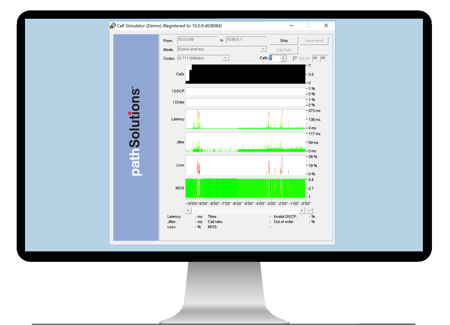
You can simulate any number of VoIP calls from one location to another so you can easily plan for network expansions and validate what you need to support them. |
Key Features
Phone Inventory
Lists all phones connected to every monitored device in your network, including:
- Phone manufacturer.
- The switch and port where the phone is physically connected.
- The health & performance of the phone’s connection to the network.
- Phone IP address (when available).
Complete Call Path Mapping—Historical and Current Utilization
See the status of an entire call path in one view – in real-time as well as historical so that you can analyze the quality of in-progress calls and resolve intermittent call quality issues. This includes:
- All devices in the call path.
- All links in the call path— including all layer-2 links.
- The health & performance of each link over the past 32 hours.
- QoS configuration of WAN links (Cisco devices only).
Complete Call Path Utilization
Gives you the current utilization of every link in a call path so that you can watch how the network is behaving and analyze potential problems while the call is in progress.
Detailed Performance Information for Every Device
Provides detailed performance information for every monitored device in time-series format so that you can easily see where problems occurred and drill-down to discover why they occurred. This includes:
- Jitter
- Latency
- Packet Loss
- MOS
Call Simulation In and Out of Your Network
Simulate any number of VoIP calls from one location to another, mapping through carrier-managed MPLS clouds or VPN tunnels:
- Track latency, jitter, packet loss, and MOS for any number of calls to any location on the network, then locate the specific link and exact cause of the VoIP issue.
- Use the IP address of the VoIP phone or gateway or the IP address of an intermediate switch or router to test individual segments of the network.
- Dynamically change number of calls to determine how your network responds to increases in load.
Performance Reporting
Daily Network Weather Report that provides information on your network’s errors, performance, and administration. Based on the utilization rate you set, it will display the interfaces that are experiencing a higher utilization rate, including error rates and peak daily utilization. It will also display a number of “top tens,” including the top ten interfaces with the most errors, top ten interfaces with the highest daily percentage transmission, and the top ten interfaces with the highest daily received percentage.
More Features
Dynamic Network Mapping |
Shows performance of all critical WAN links on one pannable map interface. |
Advanced Performance Monitoring |
Automatically monitors utilization, packet rate, broadcast rate and error rate of every network link. |
Performance Trending |
Tracks and displays historical utilization and error rates for every network link. Exports data in CSV format for further analysis. |
Availability Monitoring |
Tracks and summarizes availability for each device on your network. |
Outage Alerting |
Sends alerts via pager or email for link failures, device failures, excessive utilization and excessive errors rates. |
Asymmetric Routing Check |
Reverse call path mapping to ensure that both use the same path through the network. |
WAN Link Assessment |
Assesses your WAN’s ability to handle VoIP calls, including the number of concurrent streams that can be handled by each link. |
NAT Troubleshooting |
Determines if NAT is occurring somewhere between a VoIP phone and VoIP Monitor server to resolve one-way voice problems. |
TFTP Server |
Helps with network device configuration backups. |
Syslog Server |
Syslog messages can be received and logged and alerts generated based on the received message. |
Network Prescription Engine |
Diagnoses common problems and recommends solutions in plain English. |
Support Contract Manager |
Tracks information about support contracts and automatically alerts you when they are near expiration. |
Requirements
The PathSolutions deployment will usually reside in a shared-server or virtual-server environment. If you want to install a dedicated server for the application, server guidelines are listed in the following table. For implementations larger than 5,000 interfaces we recommend a dedicated server (these requirements are also listed).
PathSolutions VoIP Performance Manager Service installs on a Windows server (or workstation acting as a server) and can be viewed from web browsers on the network. The following requirements are for the server and client web browser.
Server Requirements. The system requirements may be low, depending on the size of your network. Keep in mind that as your network grows, you may need to increase the base system requirements
Virtual Server Requirements. Running the solution on a virtual server is fully supported for deployments below 5,000 interfaces. The server should be configured with a fixed (static) MAC address for licensing purposes.
Small Network Server Requirements |
For networks with less than 1,000 total interfaces::
|
Medium Network Server Requirements |
For networks with more than 1,000 but less than 5,000 total interfaces:
|
Large Network Server Requirements |
For networks with more than 5,000 total interfaces:
|